A free notch app for Mac
Cue turns the notch into a focus timer, a music player, a notification spot and more. It is free, and it works on Macs without a notch too.
What Cue puts in the notch
Cue turns the notch into a small control surface. It grows out of the camera cutout. Hover it to open it, tap to pin it. Here is what lives there:
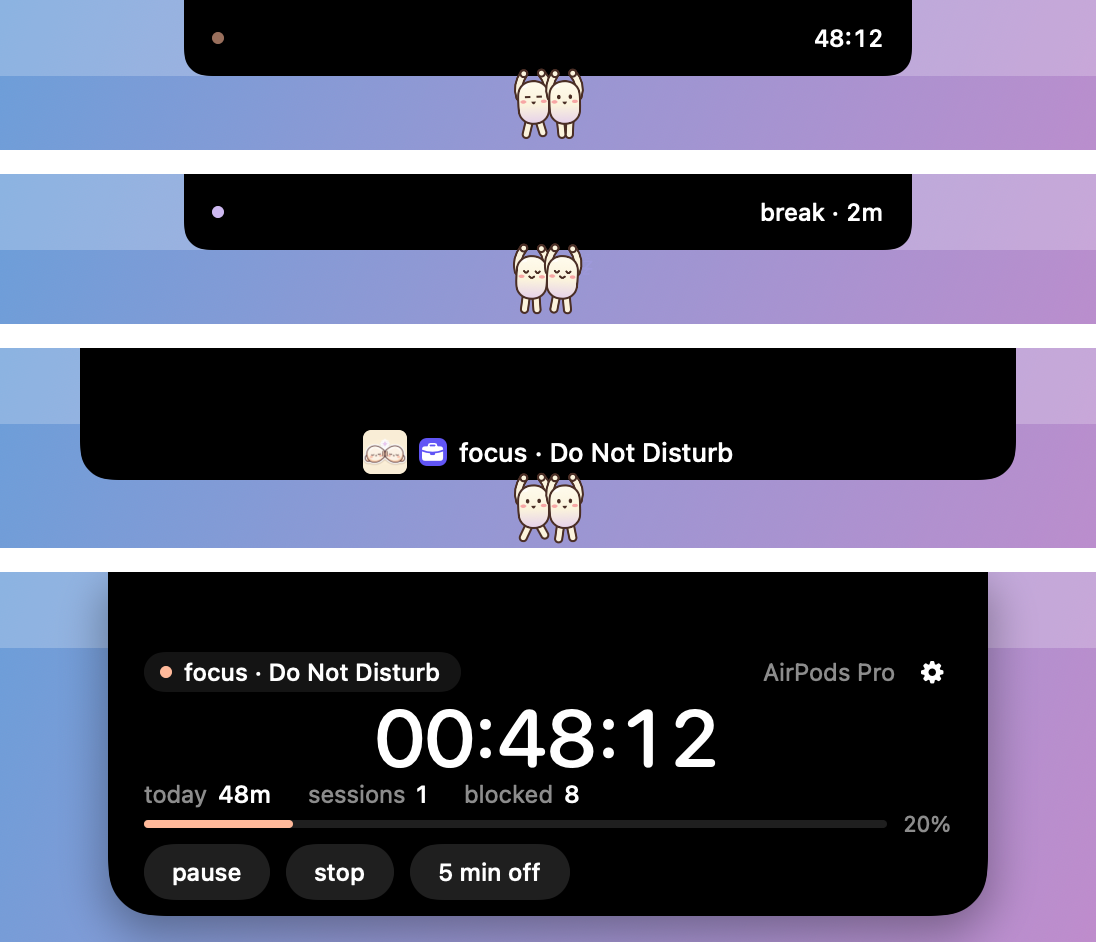
- Focus session. Put your headphones in and your Focus mode turns on, distracting sites are blocked and a timer starts. Take them out and it is break time.
- Now playing. Whatever plays, from Spotify to a YouTube tab, shows up with artwork and play, next and previous buttons. It is read on your Mac only.
- Notifications. Banners land in the notch instead of the corner, then tuck away by themselves.
- Volume and brightness. They show in the notch instead of a big box in the middle of the screen.
- Sound controls. Per-app volume, an output switch and mic mute on
⌃⌥M. An orange or green dot shows when the mic or camera is in use. - AirPods battery. Open the case and a card shows each bud's battery, with one-tap connect.
- Small islands. Keep awake, caps lock and a nudge to unplug at full charge. One switch hides the notch from screen recordings.
Colors, buddies and a little personality
You can give the notch your own colors. Pick a preset such as Peach, Lilac, Mint, Sunset or Aurora, or press Mix: Cue blends 3 to 5 colors into three options and you keep the one you like.
Two small buddies hang under the notch and react to what you do. They run while you focus, nap on your break, dance when music plays and cover their ears when the volume is loud. Outside a focus session they roam your whole screen, and when focus starts they jump back onto the notch. All 17 skins are free from day one.

No notch? Still works
Cue does not need a camera cutout. On a MacBook Air M1, an iMac, a Mac mini or a Mac Studio, Cue draws a floating 190 by 32 point pill instead. Plugged into a monitor, the same pill floats at the top of the screen. So the free notch app idea works on any Mac that runs macOS 14 or later.
If you think of it as a Dynamic Island for Mac, that is close to what you get: information that grows out of the top of the screen, then goes away. If you are looking for a NotchNook alternative, Cue is a free option that centers on one idea, your headphones as a focus switch, and adds the notch tools around it.
Free, light and private
Cue is free, with no accounts and no analytics. Your data stays on your Mac. It is made with Swift only and is light on your Mac: two roaming buddies cost no more than the notch alone.
Two things need a permission, and Cue asks you plainly. Notifications in the notch are read from banners through Accessibility, and nothing is stored or sent. Face Unlock is opt-in, for Macs without Touch ID. It is convenience, not security. A photo of you could open it.
The download is built for Apple Silicon. Cue is not notarized by Apple, so macOS asks you to confirm the first open. The install guide shows each step.
Try Cue
Free for macOS 14 or later, built for Apple Silicon.